See It In Action
Light and dark themes — with the built-in multilingual AI-generated UI security warning.
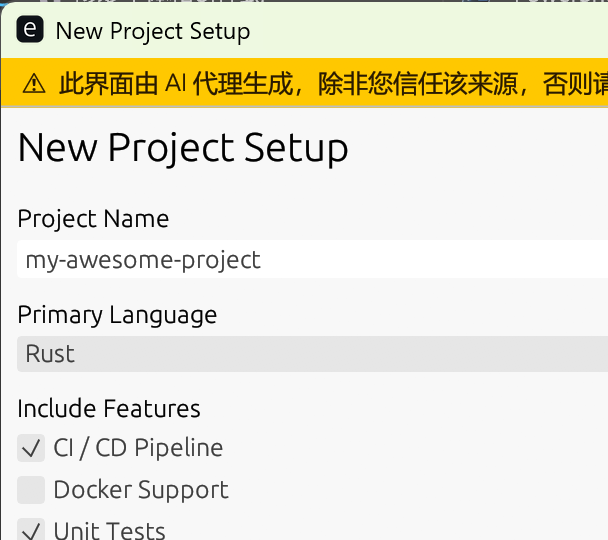
Light mode — dropdown, checkboxes, text field, slider
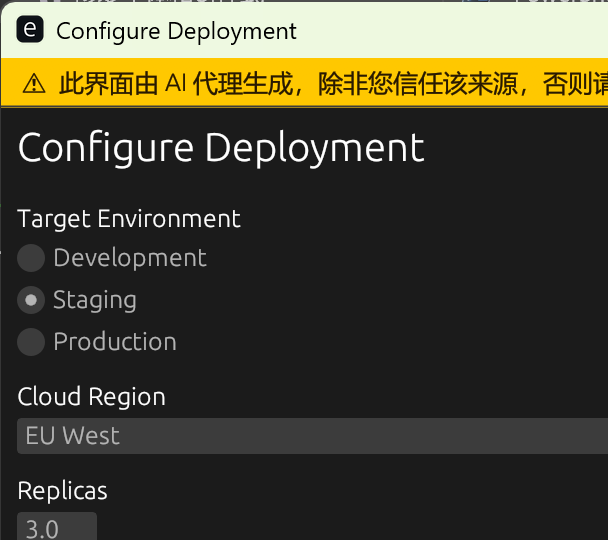
Dark mode — radio group, number input, dropdown
Native Generative UI for AI agents.
Human-in-the-loop input collection via native OS forms —
one JSON in, one native window, one JSON out. No server, no browser, no chat loop.
cargo install a2native
·
npm install @a2native/js
Light and dark themes — with the built-in multilingual AI-generated UI security warning.
Agents asking humans questions one at a time is painfully inefficient.
Agent asks a question → user types → agent asks next question → user types…
10 fields = 10 round-trips. Breaks context windows. Loses state on reconnect.
Agent generates one JSON form spec → user fills everything at once → agent gets all answers in one structured response.
10 fields = 1 round-trip. Works offline. No server required.
Four complementary protocols — each for a different layer of agent interaction.
| Layer | Protocol | Purpose |
|---|---|---|
| Agent ↔ Tools & Data | MCP | Gives agents access to tools, files, APIs |
| Agent ↔ Agent | A2A | Agent-to-agent coordination |
| Agent ↔ Web UI | AG-UI | Streaming, real-time agent↔browser integration |
| Agent ↔ Generative UI | A2UI (Google) | Declarative JSON UI for web / Flutter rendering |
| Agent ↔ Native Desktop | a2native | Sync form collection via native OS windows |
Everything an agent needs to gather structured human input.
Text fields, dropdowns, sliders, file pickers, radio groups, checkboxes, markdown, images, cards and more.
UUID-keyed long-lifecycle windows. The same window updates across multiple agent turns — no flicker, no re-spawn. Learn more →
External agents (Python, Node…) can drive a2native over HTTP/SSE or WebSocket — no CLI wrapper needed. Learn more →
Dark mode and custom accent colours via theme in the JSON spec.
Auto-close windows after N seconds with timeout. Result status becomes "timeout".
Single static binary. No Node, no Python, no browser engine. Ships as one executable file.
Every window permanently shows an amber AI-generated warning. Cannot be suppressed by the form spec.
Pause agent execution, hand control to the user for structured input, then resume — without breaking the agent pipeline.
a2native auto-detects the format. Detection priority: AG-UI → Google A2UI → a2native.
a2native's own format: one JSON object in, one JSON object out. No streaming, no protocol overhead.
JSON Schema ↗
· a2n schema
// Input — a2native
{
  "title":     "Deploy to production",
  "timeout":   60,
  "theme":     { "dark_mode": true, "accent_color": "#6C63FF" },
  "components": [
    { "id": "env", "type": "dropdown", "label": "Environment",
      "options": [
        { "value": "prod",  "label": "Production" },
        { "value": "stag", "label": "Staging" }
      ]},
    { "id": "ok", "type": "button", "label": "Deploy", "action": "submit" }
  ]
}

// Output — a2native
{ "status": "submitted", "values": { "env": "prod" } }| Component | Output type | Notes |
|---|---|---|
| text-field | string | Single-line text |
| textarea | string | Multi-line text, 4 rows default |
| password | string | Masked input — warn users not to submit secrets |
| number-input | number | Drag value with optional min/max/step |
| dropdown | string | ComboBox, value from options list |
| checkbox | boolean | Single toggle |
| toggle | boolean | On/off switch |
| checkbox-group | string[] | Multiple selection |
| radio-group | string | Exclusive selection |
| slider | number | Range slider, default 0–100 |
| rating | number | Star rating 1–max (default 5), 0 if unrated |
| date-picker | string | YYYY-MM-DD text field |
| time-picker | string | HH:MM text field |
| file-upload | string | Native file dialog; paths joined by ; |
| button | — | submit / cancel / custom actions |
| card | — | Bordered vertical group, nests any components |
| row | — | Horizontal side-by-side columns (equal width) |
| text / markdown / code / image / divider | — | Display only; code renders monospace read-only block |
Natively accepts Google A2UI v0.8+ surfaceUpdate /
beginRendering JSONL.
Emits A2UI userAction output.
Any agent SDK built for Google A2UI can drive a2native with no adaptation.
A2UI Row maps to horizontal layout; Column/List to vertical card groups.
// Input — Google A2UI JSONL
{"surfaceUpdate":{"surfaceId":"form1","components":[
  {"id":"env","component":{"MultipleChoice":{
    "options":[{"label":{"literalString":"Production"},"value":"prod"}],
    "maxAllowedSelections":1,"variant":"dropdown"}}},
  {"id":"lbl","component":{"Text":{"text":{"literalString":"Deploy"}}}},
  {"id":"btn","component":{"Button":{"child":"lbl","action":{"name":"submit"}}}}
]}}

// Output — A2UI userAction
{"userAction":{"name":"submit","surfaceId":"form1","sourceComponentId":"btn",
  "timestamp":"2026-01-01T12:00:00Z","context":{"env":"prod"}}}
Acts as an AG-UI
frontend tool: receives TOOL_CALL_START /
TOOL_CALL_ARGS /
TOOL_CALL_END events,
renders the form, emits a
TOOL_CALL_RESULT.
Tool call args can be in a2native or Google A2UI format — both are auto-detected.
// Input — AG-UI event stream
{"type":"RUN_STARTED","threadId":"t1","runId":"r1"}
{"type":"TOOL_CALL_START","toolCallId":"tc1","toolCallName":"show_form"}
{"type":"TOOL_CALL_ARGS","toolCallId":"tc1","delta":"{"title":"Deploy","}
{"type":"TOOL_CALL_ARGS","toolCallId":"tc1","delta":""components":[{"id":"ok","type":"button","label":"Go","action":"submit"}]}"}
{"type":"TOOL_CALL_END","toolCallId":"tc1"}

// Output — AG-UI TOOL_CALL_RESULT
{"type":"TOOL_CALL_RESULT","messageId":"tc1-result","toolCallId":"tc1",
"content":"{"status":"submitted","values":{}}","role":"tool"}a2native is called by AI agents automatically. Understand the risks.
The banner above appears at the top of every a2native window. It cannot be hidden by the form spec.
A compromised agent could mimic a trusted UI (fake password dialog, fake bank login).
Malicious agents can ask for passwords or API keys and exfiltrate them.
Markdown components allow arbitrary text. Attackers can craft convincing deceptive messages.
Guessable session UUIDs can be exploited by other processes on the same machine.
timeout values.
Never enter passwords or private keys into a2native forms.
Tell your agent — no SDK or setup required.
The simplest approach — include this in your system prompt or AGENTS.md:
Use `a2native` (`a2n`) to collect structured
input from the user instead of asking
questions in chat.

Quick reference:
  a2n '{"components":[...]}' # one-shot
  a2n --session UUID '...'   # multi-turn
  a2n help                   # full schema

Always include at least one submit button:
  {"id":"ok","type":"button",
   "label":"Submit","action":"submit"}
Define show_form as a tool in your framework:
{
  "name": "show_form",
  "description": "Show a native UI form to the user and return their input. Use this instead of asking questions in chat.",
  "parameters": {
    "type": "object",
    "properties": {
      "title":      { "type": "string" },
      "components": { "type": "array" }
    },
    "required": ["components"]
  }
}import subprocess, json
form = {
"title": "Configure deployment",
"components": [
{"id": "env", "type": "dropdown", "label": "Environment",
"options": [{"value":"prod","label":"Production"},{"value":"stg","label":"Staging"}],
"required": True},
{"id": "tag", "type": "text-field", "label": "Image tag",
"placeholder": "v1.2.3", "required": True},
{"id": "go", "type": "button", "label": "Deploy", "action": "submit"},
]
}
result = subprocess.run(["a2n", json.dumps(form)],
capture_output=True, text=True)
data = json.loads(result.stdout)
if data["status"] == "submitted":
deploy(data["values"]["env"], data["values"]["tag"])# npm install @a2native/js
import { showForm } from "@a2native/js";
const result = await showForm({
title: "Pick a model",
components: [
{ id: "model", type: "radio-group", label: "Model",
options: [{ value: "gpt-4o", label: "GPT-4o" },
{ value: "claude", label: "Claude" }],
required: true },
{ id: "ok", type: "button", label: "Select", action: "submit" },
],
});
// result.status === "submitted", result.values.model === "gpt-4o"Inspired by agent-browser's client-daemon pattern: the window lives, the agent turns are short. Pass the same UUID on every turn and the form updates in place — no flicker, no re-spawn.
# Turn 1 — opens the window (daemon spawns in background)
echo '{"title":"Wizard 1/3","components":[...]}' | a2n --session abc123
# → {"status":"submitted","values":{...}}

# Turn 2 — same window, new form (no new window spawned)
echo '{"title":"Wizard 2/3","components":[...]}' | a2n --session abc123

# Turn 3 — final step
echo '{"title":"Wizard 3/3","components":[...]}' | a2n --session abc123

# Close the window when done
a2n --close abc123{TMPDIR}/a2n-session-{uuid}.port. Subsequent calls with the same UUID
connect via IPC and push the new form spec without opening a new process. The egui window lives
on the daemon's main thread throughout.
For HTTP/SSE and WebSocket daemon usage, see the Advanced Usage → page.
Install via Cargo, or download a pre-built binary.
# Install from crates.io
cargo install a2native

# Or build from source
git clone https://github.com/a2native/a2native.git
cd a2native && cargo build --release

# Show help + full schema reference
a2n help

# One-shot: JSON as inline argument
a2n '{"components":[{"id":"n","type":"text-field","label":"Name","required":true}]}'

# One-shot: JSON from stdin
echo '{"title":"Pick one","components":[...]}' | a2n
For multi-turn sessions and HTTP/SSE or WebSocket integration, see the Advanced Usage → page.